

ONLINE REMOTE ACCESS REPAIR
Bringing Your Tech to Life - Remote Support
INFORMATION
-
Remote Support Services::
-
$65 per hour
-
Remote support is billed based on the actual time spent assisting with your issue.
-
Time is billed in 15-minute increments and rounded up to the next quarter-hour.
-
Unlike onsite services, remote support does not require a one hour minimum charge.
-
-
Convenient Support Without the Trip
-
We understand that finding time to bring your computer in for repair or maintenance is not always easy.
-
Everyone has busy schedules — work, school, appointments, activities, church, and everyday responsibilities. When a technology problem occurs, getting help sooner can prevent a small issue from becoming a larger problem.
-
Bringing Your Tech to Life provides convenient and reliable remote computer support that allows us to troubleshoot and resolve many issues while you remain comfortable at home or the office.
-
To request remote support, submit a service request through our website or contact us to schedule an appointment.
-
GETTING STARTED
-
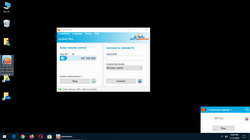
AeroAdmin requires no installation or configuration, just download and launch it on your Windows Computer.
-
Provide the AeroAdmin ID number to the Bringing Your Tech to Life technician to establish a connection.
-
Click the required prompts on the screen to allow the technician to begin working.
-
Sit back and relax while we do all the work.
-
Common services include software troubleshooting and repair, general device customization, e-mail tweaks or repair, update errors, backup problems and more.
-
As long as your device has Internet Access we can get you taken care of. Don't have Internet? Give us a call. At least with us, you don't have to press four or five prompts to speak with a real person.
STEP BY STEP SETUP FOR REMOTE ACCESS
We have provided some screen shots on getting started with Remote Access.
 |  |  |  |  |
|---|---|---|---|---|
 |  |  |  |  |
AERO ADMIN
We have provided the direct link for downloading Aero Admin Remote Access Executable File in the event that our hosting is down. Click the button to your right to begin service.
Remember never give access to unknown callers! Apple, Microsoft, your Internet Service Provider or Bank will never call and ask access to your PC! Bringing Your Tech to Life will never call you unless you have called us first or you have a scheduled appointment.